


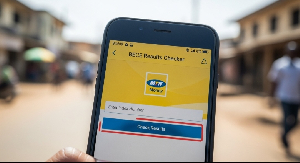
Getting your BECE results checker with MTN Mobile Money is fast and easy. You can do it all from your phone and get your checker details right away through SMS.
How to Buy Your Checker
Follow these simple steps:
Dial the Code: On your phone, dial 170# and press the call button to open MTN Mobile Money.
Go to Payments: Choose option 2 for MoMo Pay & Pay Bill.
Pick Pay Bill: Select option 2 to Pay Bill.
Choose General Payment: Pick option 5 for General Payment.
Fill in the Details: You'll need to enter:
Payment Code: Type FAST
Amount: Type 25 (this is how much the checker costs)
Reference: Type BECE
Confirm Payment: Enter your Mobile Money PIN to complete the payment.
After you pay, you'll get your checker card details and instructions through SMS right away.
Why This Method Works Great
Using MTN Mobile Money to buy your BECE results checker has many good points:
Quick and Easy: You can do everything on your phone in just a few minutes. No need to go anywhere or wait in line. This is really helpful if you live far from town.
Get It Right Away: Your PIN and Serial Number come to you instantly through SMS after you pay. You won't lose a physical card, and you can check your results immediately.
Safe and Secure:
Your payment is protected by your personal MTN Mobile Money PIN. This keeps your money safe and stops fraud that can happen with unknown sellers.
Anyone Can Use It: If you have an MTN Mobile Money account, you can use this service. This makes it available to students and parents all over Ghana.

Copyright © 1994 - 2026 GhanaWeb. All rights reserved.